

Autonomous, self-hosted AI agents have become a compelling alternative to traditional SaaS assistants: full data control, no recurring fees, and deep integration into existing infrastructure. I wanted to test this under real production conditions with Hermes Agent, an open-source (MIT) project by Nous Research running as a persistent daemon with long-term memory, cron tasks, and a multi-platform gateway (Telegram, Discord, Slack, WhatsApp, etc.).
The goal wasn't just running a five-minute curl | bash script, anyone can do that. The goal was deploying it production-style: proper user isolation, reduced attack surface, credential encryption, and a backup strategy resilient to server failures.
This guide documents every step, including real-world troubleshooting encounters, because real deployments never go strictly according to initial docs.
Final Architecture
Internet
   │
   ▼
┌─────────────┐      HTTPS (Let's Encrypt)
│   Nginx     │──────────────────────────┐
└─────────────┘                          │
   │ reverse proxy (127.0.0.1)           │
   ▼                                     ▼
┌─────────────────┐            ┌──────────────────┐
│ Hermes Gateway   │            │  Hermes WebUI     │
│ (Telegram)       │            │  (dashboard chat) │
│ restricted tools │            │  password auth    │
└─────────────────┘            └──────────────────┘
   │                                     │
   └──────────────┬──────────────────────┘
                   ▼
         ┌───────────────────┐
         │  Hermes Agent Core │
         │  (dedicated user,  │
         │   no sudo access)  │
         └───────────────────┘
                   │
                   ▼
      ┌────────────────────────┐
      │  Daily Cron at 03:00   │
      │  hermes backup → zip   │
      │  rclone → Google Drive │
      │  (encrypted config)    │
      └────────────────────────┘
Two separate systemd services (hermes-gateway.service and hermes-webui.service), a dedicated non-sudo system user, and an automated backup pipeline replicating to encrypted remote storage.
1. Core Installation
Hermes provides a one-liner installer managing runtime dependencies (Python 3.11, Node.js, ripgrep, ffmpeg) automatically:
curl -fsSL https://raw.githubusercontent.com/NousResearch/hermes-agent/main/scripts/install.sh | bash
source ~/.bashrc
hermes setup
The interactive wizard configures LLM providers (Anthropic Claude, OpenRouter, Nous Portal, or any OpenAI-compatible endpoint). At this stage everything runs, but under root, without firewall policies, and with unrestricted tools.
2. Agent Isolation: Root: Dedicated User Migration
Running an agent with terminal access, code execution, and network access as root is a shortcut that feels fine right up until it isn't. Step one: creating a dedicated unprivileged user.
adduser hermesMigrating data directories (~/.hermes and ~/.local/state/hermes), fixing ownership, and updating the systemd unit:
[Unit]
Description=Hermes Agent Gateway Service
After=network.target

[Service]
Type=simple
User=hermes
Group=hermes
ExecStart=/usr/local/lib/hermes-agent/venv/bin/python -m hermes_cli.main gateway run
WorkingDirectory=/home/hermes/.hermes
Environment="HERMES_HOME=/home/hermes/.hermes"
Restart=always

[Install]
WantedBy=multi-user.target
Gotcha Encountered: After migration, running hermes config show as root printed empty configuration, expected, as the CLI inspects the active user's $HOME. Always verify with sudo -u hermes -i before concluding there's a bug.
3. Hardening Telegram Bot Attack Surface
This is the single most critical security hardening step: by default, messaging platforms share the full CLI toolset. Anyone paired via Telegram could execute arbitrary shell commands, run code, and browse your network.
config.yaml snippet before hardening:
platform_toolsets:
  telegram:
    - terminal
    - code_execution
    - computer_use
    - browser
    - delegation
    - file
    - memory
    - web
    # ...
After hardening (retaining only essential messaging tools):
platform_toolsets:
  telegram:
    - clarify
    - cronjob
    - file
    - image_gen
    - memory
    - session_search
    - skills
    - todo
    - tts
    - vision
- webterminal, code_execution, computer_use, browser, and delegation were stripped. delegation was explicitly removed because delegated sub-agents could otherwise invoke blocked tools, bypassing the restriction entirely.
Security guardrails explicitly enabled:
security:
  redact_secrets: true      # Redacts API keys / tokens from logs & responses
  tirith_enabled: true      # Pre-execution command inspector
  tirith_fail_open: false   # Blocks (instead of allowing) if inspector fails
Setting fail_open: false is intentional: default permissive fallbacks on public-facing bots are unsafe. Pairing controls (hermes pairing approve telegram <code>) ensure only explicitly approved user IDs interact with the agent.
4. Web Dashboard: Official vs Community WebUI
Hermes includes an internal dashboard (hermes dashboard, port 9119), but I deployed Hermes WebUI (community MIT project) for rich chat features, session tracking, streaming, and file browsing.
Using third-party tooling requires risk trade-offs offset here by: loopback binding only, strict password authentication, and HTTPS reverse proxy encapsulation.
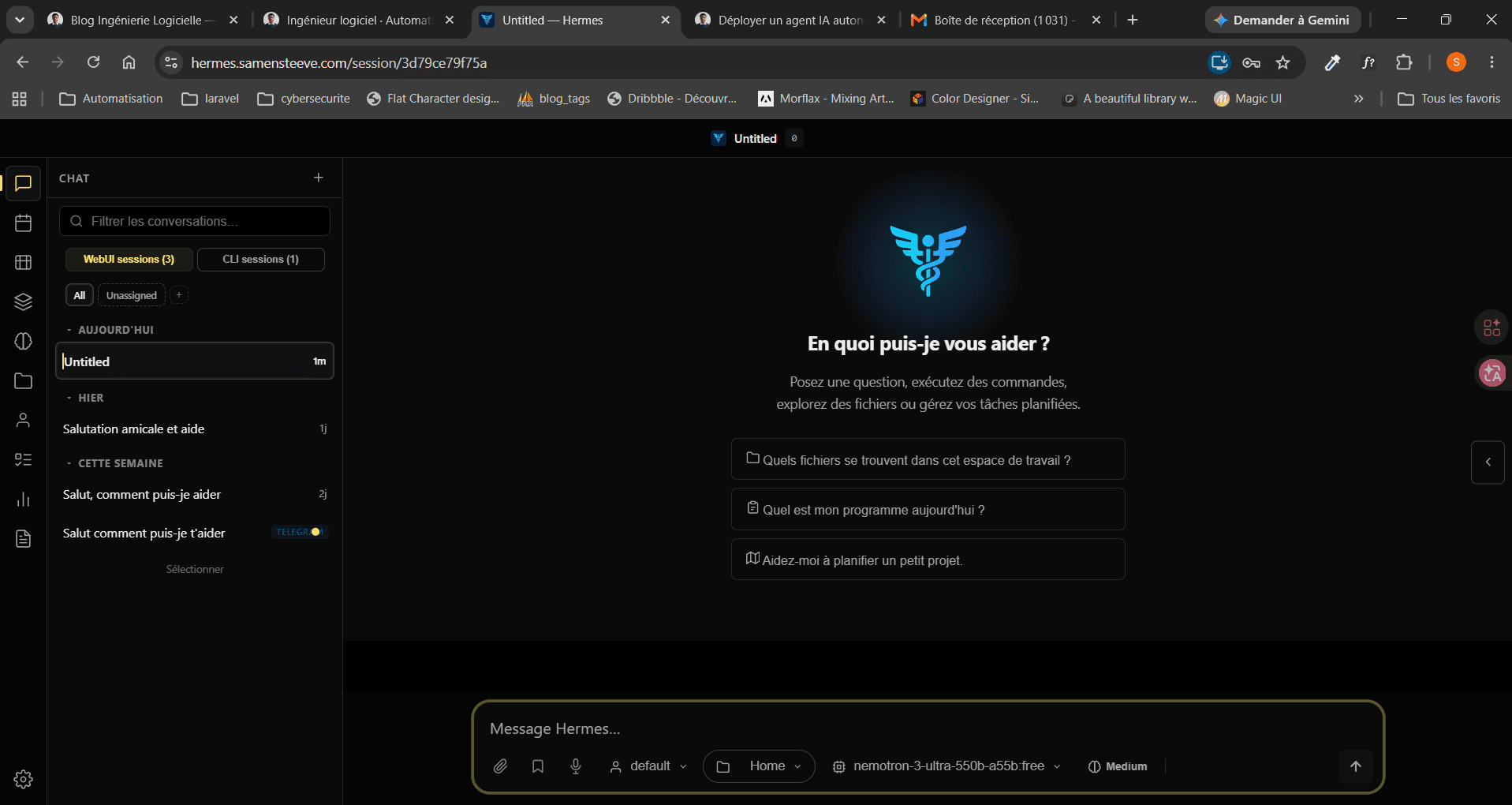 Hermes WebUI running in active production on hermes.samensteeve.com with multi-channel sessions (WebUI & Telegram).
git clone https://github.com/nesquena/hermes-webui.git
cd hermes-webui
python3 bootstrap.py
Security configuration in .env:
HERMES_WEBUI_HOST=127.0.0.1
HERMES_WEBUI_PASSWORD=<strong-generated-password>
HERMES_WEBUI_SECURE=1
HERMES_WEBUI_ALLOWED_ORIGINS=https://hermes.yourdomain.com
Three Real Bugs Encountered and Fixed
-
Python interpreter conflict: The service used the system Python (
/usr/bin/python3), which lacked the agent's dependencies (httpx,dotenv...). Fix: pointExecStartdirectly at the agent's virtualenv instead of duplicating dependencies. -
Zombie process blocking the port: A stale process from a failed restart prevented the new service from starting (
FATAL: Another server is already responding on 127.0.0.1:8787). Resolved by identifying the PID withss -tlnpand killing it explicitly. -
Malformed YAML: A manual config edit left a commented section header (
# security:) with uncommented children below it, orphaned nodes to the YAML parser. Always validate withpython3 -c "import yaml; yaml.safe_load(...)"before restarting a production service.
Nginx reverse proxy + Let's Encrypt for public HTTPS exposure:
server {
    listen 80;
    server_name hermes.yourdomain.com;

    location / {
        proxy_pass http://127.0.0.1:8787;
        proxy_set_header Host $host;
        proxy_set_header X-Forwarded-Proto $scheme;
        proxy_set_header Upgrade $http_upgrade;
        proxy_set_header Connection "upgrade";
    }
}sudo certbot --nginx -d hermes.yourdomain.com5. Automated, Encrypted, Redundant Backups
An agent accumulating long-term memory and auto-generated skills becomes increasingly valuable over time, losing it to a server incident would be a real cost. Strategy: daily local backup + replication to Google Drive, with 14-day rotation on both ends.
#!/bin/bash
set -euo pipefail
cd /home/hermes

export RCLONE_CONFIG_PASS="********"   # rclone config encrypted with this password

BACKUP_DIR="/home/hermes/backups"
DATE=$(date +%Y%m%d-%H%M%S)
KEEP_DAYS=14
GDRIVE_REMOTE="gdrive:hermes-backups"

hermes backup -o "$BACKUP_DIR/hermes-backup-$DATE.zip" -l "daily-cron"
rclone copy "$BACKUP_DIR/hermes-backup-$DATE.zip" "$GDRIVE_REMOTE" --quiet

find "$BACKUP_DIR" -name "hermes-backup-*.zip" -mtime +$KEEP_DAYS -delete
rclone delete "$GDRIVE_REMOTE" --min-age ${KEEP_DAYS}d --quiet
Scheduled via cron under the application user, never root:
0 3 * * * /home/hermes/scripts/backup-hermes.sh >> /home/hermes/backups/backup.log 2>&1Security points applied to this component:
- rclone config encrypted with a password (contains a Google OAuth refresh token with Drive access)
- Password injected via environment variable (never as a command argument visible in
ps auxor shell history) - Personal Google OAuth client instead of rclone's shared client_id (end-of-life in 2026)
- Restrictive permissions (
chmod 700) on scripts and backup directories
What This Project Demonstrates
System Hardening
Privilege migration, permission enforcement, isolation of a high-risk process.
Network Architecture
Reverse proxying, TLS termination, loopback/public separation between services.
Secrets Management
At-rest encryption, secure runtime injection, automatic log redaction.
Reliable Automation
systemd units, cron scheduling, idempotent shell scripting with strict error handling (set -euo pipefail).
Code is only half the work on this kind of project, the other half, often overlooked, is the question: "who can do what, and what happens when things go wrong?" That second half is what separates a five-minute curl | bash from a deployment you can reasonably leave running unsupervised.